The Problem That Started This
I was building a notification system. Nothing too fancy at first — a user does something, and we need to tell them about it. Browser toast, maybe an email if they're offline, a line in their activity feed.
My first instinct was the obvious one: just call everything in sequence. Process the order, send the toast, fire the email, log the activity. Done.
It broke within a week.
An email provider had a hiccup — not even a full outage, just a few seconds of slowness — and suddenly users were staring at frozen screens. One slow service was dragging everything else down with it. That's when I realized: I'd built a system where the weakest link determines the speed of the entire request.
So I tore it apart and rebuilt it around one idea: asynchronous communication.
What Asynchronous Actually Means
Most services talk to each other the way you'd expect: one asks, the other answers, and the first one waits. This is synchronous communication. It's simple, it's intuitive, and it's the default for a reason — it works great when things are fast and healthy.
But "fast and healthy" is a bet, not a guarantee.
Asynchronous communication flips the model. Instead of waiting for a response, a service fires off an event — something like "order placed" or "password changed" — into a broker, and immediately goes back to doing its own work. Other services that care about that event subscribe to the broker and process it on their own schedule. The sender doesn't know or care who's listening.
It's the difference between calling someone and asking them to do something, versus sending them a message and moving on with your day.
Why This Matters for Real Systems
The benefits aren't just theoretical. Here's where they showed up for me:
Decoupling. Your payment processing logic shouldn't know or care that there's an email service downstream. When you hardcode dependencies between services, a change in one ripples through everything. Async keeps them independent.
Resilience. When the email provider went down in my original system, the whole notification pipeline froze. With a queue in between, the message just sits there safely until the email service comes back. The user never notices.
Load smoothing. During a product launch, we had thousands of notifications landing per second. A queue absorbs that spike, and background workers process them at a steady pace. No crashed servers, no angry users.
Five Ways to Route Messages
Not all async communication is the same. Depending on who needs the message and how fast they need it, you'll take different architectural paths. Here are the five I ended up using in a single system.
Pub/Sub: The Broadcast Model
The simplest mental model: a publisher sends a message to a topic, and every subscriber gets a copy. Think of it like a radio station — you broadcast once, and everyone tuned in hears it.
In practice, this is great for fan-out within your own services. When an event happens and multiple internal microservices need to react, pub/sub is the quickest way to notify them all without tight coupling.
Redis Streams: The Real-Time UI Layer
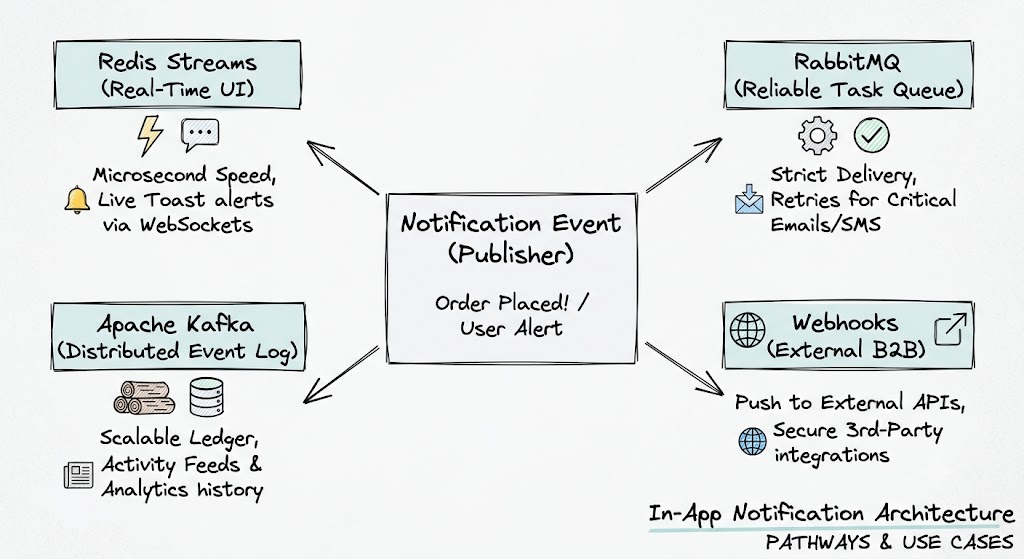
Redis Streams live in memory but keep an append-only log, so you get both speed and a short-term history. This became the backbone of our browser notifications.
A WebSocket server subscribes to a Redis stream, and whenever a new notification lands, it pushes it to every connected client. If someone briefly loses connection and reconnects, they can catch up on anything they missed. It's the part of the system that makes the toast notification pop up the instant something happens.
RabbitMQ: The Reliable Worker
When you absolutely cannot lose a message — security alerts, billing failures, anything transactional — RabbitMQ is the right tool. It's an AMQP broker that holds messages in a queue until a worker explicitly acknowledges them.
If the email service is down, RabbitMQ doesn't panic. It just holds the message and retries when the service recovers. For critical notifications where losing even one would be unacceptable, this is the safety net.
Apache Kafka: The Event Ledger
Kafka is a different beast entirely. It's a distributed commit log built for massive throughput, where messages are written to disk and retained for days. Multiple systems can independently replay the same stream of events at their own pace.
We used Kafka for the notification history timeline — the "Activity" tab you see in most apps — and for feeding interaction data into our analytics pipeline. It's overkill for a single notification delivery, but it's irreplaceable for building a historical record and letting downstream systems consume data on their own terms.
Webhooks: The External Bridge
Sometimes the notification needs to leave your system entirely. Webhooks are an inverted API: instead of your server receiving requests, it sends outbound HTTP POST calls to URLs that third-party developers have registered.
This is how platforms integrate with each other. When Stripe processes a payment, it hits your webhook URL. When your system needs to notify an external CRM or monitoring tool, it sends a POST to their endpoint. It's the B2B layer of your notification architecture.
At a Glance
| Feature | Redis Streams | RabbitMQ | Apache Kafka | Webhooks | | --- | --- | --- | --- | --- | | Data Storage | In-Memory Log | Smart Queue (RAM/Disk) | Distributed Disk Log | No storage (Direct HTTP) | | Delivery Target | Internal Live Clients | Internal Workers | Internal Log / Ecosystem | External Third-Party APIs | | Consumption | Push (Blocking Read) | Push (Worker Subscriptions) | Pull (Offset-based) | Push (HTTP POST Request) | | Primary Strength | Microsecond Latency | Robust Routing & Safety | Massive Scalability | B2B Extensibility |
Putting It All Together
The beauty of this design is that a single event can fan out across all five paths simultaneously. Here's a simplified look at what that looks like in code:
interface Notification {
  userId: string;
  title: string;
  message: string;
  type: 'security' | 'feed_update';
  externalWebhookUrl?: string;
}

async function handleNotificationEvent(event: Notification) {
  const payload = JSON.stringify(event);

  // Real-time UI push via Redis Streams
  // WebSocket servers pick this up and push to connected browsers
  await redis.xadd('stream:ui_notifications', '*', 'data', payload);

  // Critical delivery via RabbitMQ
  // If the worker is down, the message waits safely until it's back
  const exchange = 'alerts_exchange';
  await rabbitChannel.publish(exchange, event.type, Buffer.from(payload), {
    persistent: true,
  });

  // Historical feed and analytics via Kafka
  // Appends to a persistent event log that other systems can replay
  await kafkaProducer.send({
    topic: 'user-activity-feed',
    messages: [{ key: event.userId, value: payload }],
  });

  // External integrations via Webhooks
  if (event.externalWebhookUrl) {
    try {
      await fetch(event.externalWebhookUrl, {
        method: 'POST',
        headers: {
          'Content-Type': 'application/json',
          'X-Signature': 'security_hash',
        },
        body: payload,
      });
    } catch (err) {
      // Failed webhook goes to a dead-letter queue for retry
      await queueFailedWebhook(event);
    }
  }
}
The key insight: one event, four different delivery mechanisms, each optimized for a different use case. Redis handles the instant UI updates. RabbitMQ ensures critical alerts never get lost. Kafka builds the long-term history. Webhooks extend your system to the outside world.
When You Don't Need All of This
It's worth saying: not every notification system needs five backends. If you're building a small app with a handful of users, a single Redis queue and a worker process might be all you need.
The framework scales down too. Even with just one path, the core idea holds — your business logic shouldn't be blocked by downstream tasks. Start with the simplest thing that works, and add paths as your requirements demand them.
Asynchronous architecture isn't about complexity for its own sake. It's about building systems where a slow or broken component doesn't take everything else down with it. That's a principle that applies whether you have ten users or ten million.